

The "SetenitysWay" Project - Week 9,10,11&12 (tri 2)
- Julia Toczyska
- Apr 20, 2024
- 5 min read

Updated: Apr 21, 2024
In this blog post, I will be going through my creative process of developing my cuddling bots! A redesign of 1966 Eliza chatbot therapist.
Presentation
By the end of this trimester, we were ask to present a project pitch to the whole class - a stressful task, but I am quite proud with how my presentation turned out! (Please read through the whole blog before watching the presentation, as it goes through exactly the same information, just with a lot more detail!)
In Depth Creation Process
My initial idea back in trimester one was to redesign the 1966 chatbot therapist Eliza by Joseph Weizenbaum. We got introduced to Eliza during the second lecture of Practical History, and ever since I knew that it would be interesting to see what updated Eliza would look and be like.

Research
Eliza is a therapist chatbot, however, while redesigning her I decided to change up some things. Since I was going to make a physical body for Eliza I thought that I might as well take advantage of that.
While researching I stumbled across a niche of therapy - cuddle therapy. Its goal is to provide emotional support, stress relief, and create a sense of connection. Cuddle therapy can be beneficial for individuals experiencing loneliness, anxiety, depression, or simply seeking relaxation.
I thought it would be an interesting idea to design a robot which could perform cuddle therapy. After all, wouldn’t it be a tiny bit less awkward to hug a robot? I mean I know for a fact I would feel weird cuddling strangers and on top of that paying for it.
Initial Goal
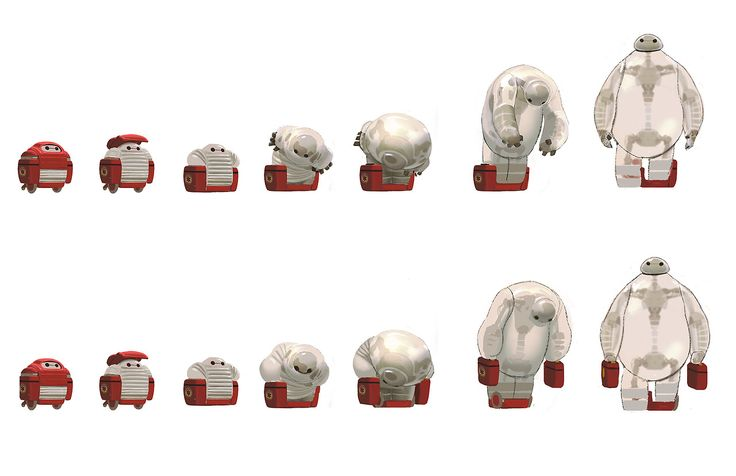
My first mood bords were strongly inspired by the character Baymax from Big Hero 6, as well as the adorable Eiliks!
Eiliks are tiny robots designed to perform various tasks, ranging from customer service to healthcare assistance. They are equipped with advanced sensors and algorithms that allow them to interact with humans and understand spoken commands. I found it extremely inspiring how Eiliks manage to integrate robotics to everyday tasks, improving efficiency and convenience. And not only that, their amazing design is so pleasing to look at!
The goal was to create a Baymax like inflatable body, with a facial display of a Eilik. The soul reason as to why I chose Baymax in the first place was because of his big inflatable body - I mean just look at him! Additionally, what I loved about Baymax's design was his ability to deflate. This function strongly influenced me, as it would allow my robot to deflate into a highly portable form, making it easy for storage and transport.
Prototype
Initially, I intended to create a physical prototype for this project - just like I mentioned all the way back in week 4. I was planning to follow the tutorial by Erin St Blaine, where they go over how they reprogramed a Teddy Ruxpin animatronic, as well as tortured the poor plush with a whole body makeover.
Unfortunately, I never got my hands on the specific animatronic they used, but if I did I would definitively follow in Blaine's footsteps into plushie torture. My idea was to take one of Disney's Baymax plushie and gift him a whole new existence of being a prototype of a professional cuddler.
Change of Direction
Since I wasn't able to create a physical prototype, I had to change what my final piece will be. In the end I turned to what I am most familiar with, making advertisements. I decided to create "official" advertisement for my product. I aimed to create a brand identity, as well as the product itself, which I ended up generating using Microsoft's Image Generation tool.

I was strongly inspired by the Curry's adverts while making my own. Curry's is a retail company specialising in electronics and home appliances. It has some similarities to my project hence why I found it to be a perfect source of inspiration. I found their adverts perfectly minimalistic and eye catchy at the same time.
AI Generation, And It's Down Sides...
Despite the amazing capabilities of AI, sometimes the simplest tasks can prove to be a nightmare... and so was my attempt at bringing my concept to life. The design changed from a Baymax like inflatable design into a fluffy one as AI REALLY struggled understanding the word "inflatable"... I have generated multiple images with the prompt "Big hugging robot, featuring a futuristic fluffy design, and a face screen display". It was hard to generate exactly what I wanted, and surprisingly getting the product in frame. I have tried to extend my images using Adobe Firefly, but to be completely honest I have never used a worst tool in my entire life.


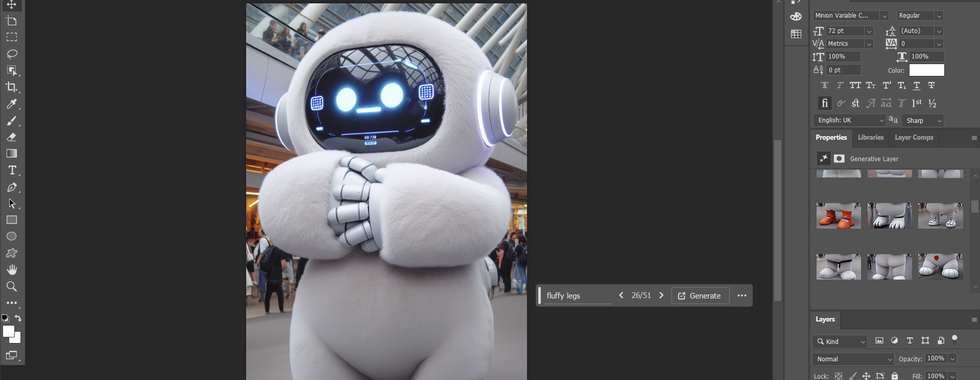
In the end I have scrapped the previous image as Adobe Firefly was giving me actual nightmares. I've decided to backtrack a little and generated an entirely new one.
To my surprise it was a great choice! It is interesting how Microsoft's AI manages to generate very similar results each time with the same prompt. The robot looks quite identical to the previous one, which is quite interesting as to why. Overall, I am very please with Microsoft's AI generation, just wish they add a aspect ratio in the future!

Editing time!
While creating my final piece, I decided to create a fake company that is advertising its newest product – therapy bots. I've named it "SerenitySway" to convey its focus on comfort robotics.
So, with the company concept in mind, I used Photoshop to create the advert. The first attempt wasn't great... I had problems with implementing text on such a busy background... No matter how hard I tried to roll with it, it just wasn't working out.

After messing around for solid few hours, I admitted defeat and decided to rework the whole thing. I have decided to completely separate the robot from its background - the idea was to make the background a muted colour which in theory would make it less intrusive. Additionally, it gave me a brilliant idea, what if I animate the whole ad? (we will come back to this idea later on!) On top of changing the design, I have decided to create a proper colour scheme this time, which really helped me stay on track.

I chose a primarily blue colour scheme as blue is often associated with concepts of technology, innovation, and this is why I set my mind on this colour scheme.
The colour blue reminds me of qualities such as trustworthiness and reliability. In a design context, these associations can create a sense of confidence and trust in a product. Exactly the themes I wish to convey with my project!
With the colour scheme in mind, and all the Curry's ad inspiration, I believe I have managed to create a pretty clean advert for my cuddling bots! I have added some little details, such as a fake email and website for my made up company just to make it a bit more believable.

Animation

As mentioned, I have decided to animate the whole thing! I decided to add simple animations to keep the ad engaging without overwhelming viewers.
The intention was to create a short, looped TikTok ad that wouldn't be too intrusive. I have animated the whole thing in Adobe Express using its text and shape animation.
Outcome!
Evaluation
Overall, I am very pleased with the final product! I believe I managed to recreate my ideal almost perfectly. Of course there are some minor issues I have with this design, for example the LED display on the robots chest, which I believe wouldn’t be that comfortable to cuddle... Let's just say that display has a very nice and comfortable cover! The project had it's ups and downs, I am quite upset I didn't make a physical prototype in the end. I still want to experiment with robotics in the future and I am glad that I have researched such an interesting topic. Other than that, I am highly satisfied with the final product!


Comments