Week 4 - Storyboarding
- Julia Toczyska
- Oct 15, 2024
- 3 min read

Updated: Dec 14, 2024
Today, we have looked at the essential role of storyboarding. But before we delve into what an actual storyboard is, let's look and break down the construction of an narrative.
Story Arcs
Narratives consist of what is known as story arcs. A story arc is the chronological construction of a plot in a novel or story. It can also mean an extended or continuing storyline in episodic storytelling in media such as television, comic books, video games, etc. In a television program, for example, the story would unfold over many episodes.

Production Process in After effects & Storyboarding
Stage 1 - Pre-Production
Concept Development
Synopsis
Mood Boards
Storyboards
Pre-Vis
Stage 2 - Production
Asset Creation
Artwork - Photoshop • Illustrator • Procreate • Model • Hand drawn
Stage 3 - Post-Production
Animation and Editing
After Effects
Final Export
So Finally, Storyboarding

A storyboard is a visual representation of a story or narrative, typically used to plan out the key scenes in a movie, TV show, commercial, animation, title sequence, graphic novel or game. Storyboards are a crucial part of the preproduction process and are used to:
Guide the production process: Storyboards are a roadmap that help know which scenes need to be created and how to create them.
Work out length: Storyboards can be used to decide how long a piece needs to be and how you are going to make it.
Test ideas: Storyboards are a useful way of working out what is needed to tell the story, it can be updated and changed at anytime.
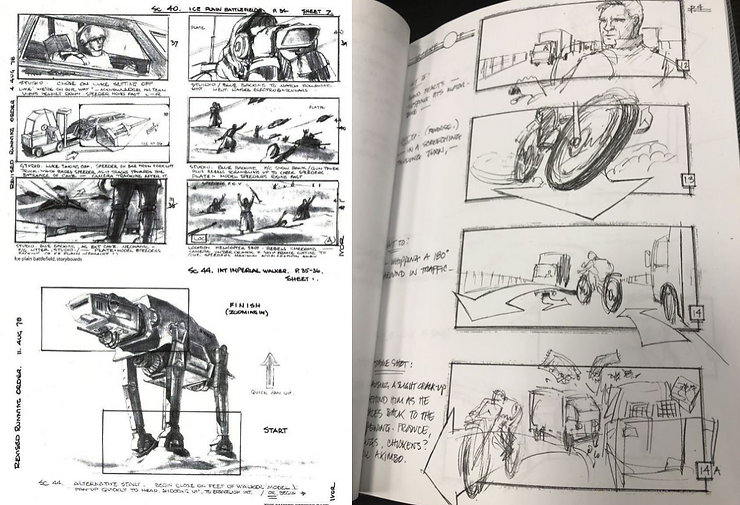
Storyboards are made up of a series of images or illustrations that represent key shot along with notes about what's happening in the scene. They can be hand-drawn, or digital. The finished storyboard resembles a comic book or graphic novel.
Annotation
Storyboard annotations are essential for multiple reasons. They provide enough context, clear up any confusing details, and make sure everyone is on the same page. With annotations, the creative vision as well as the technical instructions are easy to follow and put into action.
My Storyboard
Before applying any research of storyboarding, I needed to consider a very important thing - do I want to create a physical or a digital storyboard? Is making a digital storyboard an actual thing? The answer is yes! While looking online, a lot of people nowadays use digital storyboarding in everyday practise. I have looked up a bunch of tutorials and tips online that can help and guide me.
I have found this video in particular extremely useful. As I am already quite familiar with the program Procreate, I have decided to use it. This guy perfectly explains how to make a great storyboard on Procreate, and I found his use of layers as separate panels extremely neat.
Colour Palette
Through using colour in storyboards, the author defines the theme, aesthetics, and overall colour palette. By connecting the events, the mood of the location and the characters with the colours, we ask ourselves what the viewer should feel when watching, what emotions and impressions these things will cause.

In my case, I have stuck to a monochrome colour palette, mostly featuring black and different tones of grey to further highlight the darker themes of the narrative. Additionally, I have used pops of magenta to exaggerate certain elements and to complement the scenes as a whole.
Looking at my research from week 2 and 3, I have used my Pinterest board and my Miro board as a great source of inspiration in terms of the visuals featured in my storyboard. I found the experience relaxing in many ways, and coming up with every transition from one panel to another was extremely satisfying. In the end, I stuck to my original concept, including the dark subtext and symbolisms of hands, eyes, angels and mechs I have described a couple posts back.

Final Storyboard
So far I am immensely satisfied with the final storyboard. I might revisit it at some point in the near future but that is more than fine, after all ideas often shift and change during the development process. One thing I haven't featured as much is the annotation, I feel like I could've done more in that regard, however, I struggled to do so without overwhelming the scene. Perhaps if I used a premade template it would've helped, but at this point I would rather add notes on a separate page than redoing the whole storyboard with a template. Overall, for my first digital storyboard, I believe it turned out great and I am more than excited to see this animation come to life.


Comments